Every CS2 item you own, what it cost, and what it is worth.
ForceBuy reads your Steam inventory and your purchases on the Steam Market and the marketplaces you use, and keeps them in one ledger: value, cost basis, profit and loss, in your currency.
ForceBuy on the web is in a closed test. Signing in shows whether your account is part of it.
Invented items and prices, no Steam account, gone after two hours.
Read-only
No Steam password
Never lists, sells or trades
Example
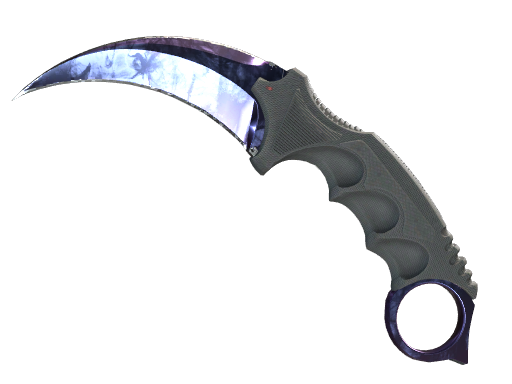
★ Karambit | Doppler (Factory New)
Phase 2 · Float 0.0123
Bought on CSFloat12 Mar 2026 · read from your CSFloat history$1,540.00
Moved into storage unit “Knives”14 Mar 2026 · read from your Steam inventory history
Worth today on Buff163today · Phase 2 priced on its own$1,852.01
If you sold it today, after each marketplace's fee
CSFloat$1,851.22most left
Buff163$1,805.71
Skinport$1,751.20
Steam$1,895.66Steam Wallet
Profit after fees+$311.22 (+20.2%)
Prices fromSteamCSFloatBuff163YouPin898SkinportC5Game+ more to come
Purchases and sales read fromSteamCSFloatBuff163+ more to come
From sign-in to a full ledger
No spreadsheet and nothing to type in. ForceBuy reads what Steam and the marketplaces already know about your items.
1
Sign in with Steam
Steam confirms who you are through OpenID. ForceBuy never sees your password or your authenticator codes.
2
Choose what ForceBuy may read
Your public inventory works right away. Add your Steam session for a private inventory and your Steam market history, a CSFloat key or Buff163 session for theirs: encrypted, logged on every use, revocable at any time.
3
The ledger fills itself
Purchases, sales, trades and storage moves are tied to each item. Prices from six marketplaces, with more to come, update several times a day.
What you get
Real purchase prices, automatically
Every purchase and sale on the Steam Market, CSFloat and Buff163 is read and tied to its item, so each one keeps what you paid for it. More marketplaces are on the way. No spreadsheet, nothing to type in.
All marketplaces in one view
Prices from Steam, CSFloat, Buff163, YouPin898, Skinport and C5Game side by side, with more to come, and dashboards you lay out yourself.
Every copy valued as what it is
Float and pattern on every item, applied stickers that can add to its value, Doppler phases priced on their own, and what a sale would leave after each marketplace's fees.
Storage units and past items count too
Items in storage units are read and valued like the rest, and items that already left the account keep their record: what they cost, what they sold for, what they made.
Typed in by hand, or read for you
Most CS2 portfolio trackers value your inventory and leave the rest to you. ForceBuy starts from what you paid.
Typed in by hand, or read for you
Usual tracker
ForceBuy
What you paid
What you paid
You type it in, item by item
Read from Steam Market, CSFloat and Buff163, more to come
Items you sold
Items you sold
Gone with the item
Keep cost, sale price and profit
Trades and storage units
Trades and storage units
The price trail breaks
The item keeps its purchase price
Fees
Fees
One rate, or none
Each marketplace's own fee, Steam as wallet money
Doppler phases, stickers, float
Doppler phases, stickers, float
Price of the plain skin
Every copy valued as what it is
Access to your account
Access to your account
Some tools move, list or trade for you
Only reads. Cannot list, sell or trade
Half a minute through the app
The real interface with demo data: dashboard, holdings, an item and what a sale leaves, history, search and collections.
What ForceBuy reads, and what it never does
Reads
Your CS2 inventory, public or, with your session, private
Your inventory history: how each item arrived and left
Your purchases and sales on the Steam Market, CSFloat and Buff163, with more to come
Prices for the whole catalogue from six marketplaces, with more to come
Never
Asks for your Steam password
Lists, buys, sells or trades an item, or accepts an offer
Shows your inventory to anybody else
Advertising or analytics
Stored sessions and keys are encrypted, never shown again, and expire after 30 days without a sign-in. The server is in Germany.
Asked before signing in
Where do the purchase prices come from?
From the histories of the places where you bought. With your Steam session, ForceBuy reads your Steam market history, which lists every market purchase and sale with its price. With a CSFloat API key it reads your CSFloat trades, and with your Buff163 session your Buff163 purchases and sales.
Each purchase is tied to the exact copy in your inventory. Where that is not certain, the match is marked "Ambiguous". Items with no purchase on record, such as trades and drops, get a cost by hand, from a CSV import or from a cost rule such as "drops cost nothing".
Do I have to give ForceBuy my Steam cookie?
No. Without it ForceBuy reads the public view of your inventory, which needs your inventory to be public, and values it with current prices. Purchase prices then come from CSFloat, Buff163 or your own entries.
With the cookie ForceBuy can also read a private inventory, the contents of your storage units, your inventory history and your Steam market history. You can paste it by hand or let the ForceBuy browser extension hand it over for you (Chrome, Edge and Firefox).
Can ForceBuy trade, sell or list my items?
No. Every request ForceBuy sends to Steam, CSFloat, Buff163 or any other marketplace is a GET request that only reads. ForceBuy never lists, buys, sells, trades or accepts an offer, not even behind a confirmation.
A Steam or Buff163 session would allow those actions to anyone who holds it. That is why stored sessions and keys are encrypted, never shown again, and every use is listed under Settings > Stored access.
Who can use ForceBuy right now?
ForceBuy on the web is in a closed test. Sign in with Steam to find out whether your account is part of it. If it is not, the page shows your SteamID64 and an address to ask for access.
Without signing in, the demo shows the whole app with invented items and prices. It needs no Steam account and is deleted after two hours.